Certificate Unpinning on Ecovacs Goat
Disclaimer
Accessing and modifying your Ecovacs Goat is risky and may permanently damage your device.
These steps may void your warranty or violate your terms of service, and Ecovacs may refuse
support for modified devices. Proceed entirely at your own risk!
Note
These instructions were tested only on a Goat O500. Details may differ on other models.
🟢 Simple Certificate Replacement
This method only updates certificate files on the device.
No firmware unpacking or flashing is required.
1. Start UART Console (on host)
Connect to the Goat UART serial port.
Note
Adjust parameters as needed:
/dev/ttyACM0: device name may differ--log / --log-file: optional, remove if you do not want logs
With picocom:
Or with tio:
tio /dev/ttyACM0 --flow none -b 115200 --log --log-file ./b-capture-"$(date --iso-8601=seconds)".log
| Goat O500 UART |
|---|
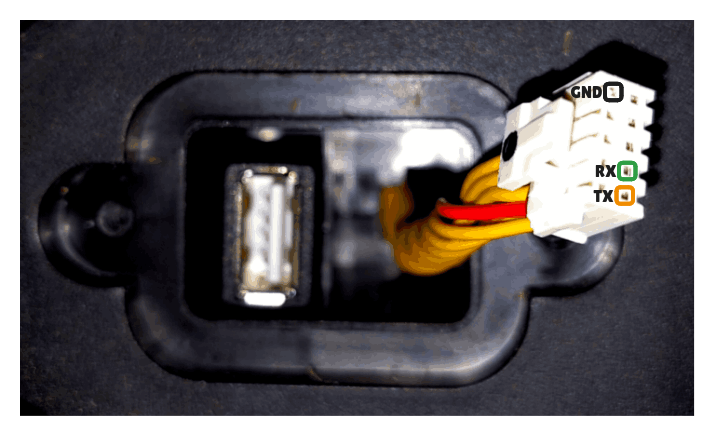 |
Pinout (O500):
| 1/6 | 2/7 | 3/8 | 4/9 | 5/10 |
|---|---|---|---|---|
| 5V (RED) | NC | NC | NC | GND |
| UART TX | UART RX | NC | NC | NC |
UART voltage
Never connect the 5 V pin to your UART adapter.
2. Interrupt Boot and Enter Hobot (on Goat)
During power-up, interrupt the boot process to enter Hobot (press any key).
Note
On some Goat you need to hit a specific key mentioned during the boot-up process like:
Sometimes picocom does not work; in that case, try minicom.
Keep pressing your key (e.g. CTRL+C) during the boot process until it is interrupted.
3. Locate the eMMC and userdata Partition
Unlike older Ecovacs bots, Goat devices do not allow modifying bootargs
to drop into Linux.
All changes are performed from U-Boot by directly accessing the eMMC.
3.1 Select eMMC Device
Device 0 is typically the internal eMMC.
Check write-protection status:
Expected output:
3.2 Identify userdata Partition
List partitions:
On Goat O500, userdata is typically:
- Partition 16 (hex
0x10→mmc 0:10)
Verify filesystem access:
You should see directories such as /certs.
3.3 Verify Existing Certificate Location
Before writing anything, confirm that the existing certificate file exists and is readable.
Note
If UART logging is enabled, the original certificate contents will also be captured in the UART log, which effectively serves as a backup.
# Load existing certificate into RAM
ext4load mmc 0:10 0xc2600000 /certs/master.pem

# Dump loaded content to verify correctness
md.b 0xc2600000 <FILE-SIZE-HEX>

# Optional: inspect full CA bundle
# ext4load mmc 0:10 0xc2600000 /certs/ca-certificates.crt
4. Replace Certificates (on Goat)
The replacement is done by:
- Injecting the new certificate into RAM via UART
- Writing it back into the
userdatapartition
4.1 Inject Certificate into RAM (on host)
Close picocom/tio/minicom before running the script (only one program can
hold the serial port). The script sends U-Boot mw.l/mw.b commands to inject
the PEM into RAM, then prints the ext4write command. It does not run
ext4write itself (run that in the Goat U-Boot shell).
python3 -m venv .venv
source .venv/bin/activate
python3 -m pip install pyserial

python3 scripts/device/install-goat-certs-serial.py \
  --port /dev/ttyACM0 \
  --cert ./certs/ca.crt \
  --target /certs/master.pem \
  --mmc-part 10
Adjust --port, --cert, --target (e.g. /certs/ca-certificates.crt if you
need to replace the bundle), and --mmc-part for your model (Goat O500 userdata
is typically mmc 0:10). Use --dry-run to print the planned writes and the
ext4write/md.b commands without opening the serial port.
4.2 Write Certificate to eMMC (on Goat)
Execute the printed command in U-Boot:
# Write injected certificate from RAM into userdata
ext4write mmc 0:10 0xC2600000 /certs/master.pem <FILE-SIZE-HEX>
Verify write success:
# Reload certificate from eMMC
ext4load mmc 0:10 0xc2600000 /certs/master.pem
# Compare with injected content
md.b 0xc2600000 <FILE-SIZE-HEX>
5. Reboot
The Goat now trusts your custom CA.
📝 Notes
- Always backup your data before making changes.
- Firmware updates or factory resets may overwrite certificates.
- For certificate creation, see Create Certificates.
- For more context, see Architecture and App Certificate Unpinning.
📚 References
- https://dontvacuum.me/talks/37c3-2023/37c3-vacuuming-and-mowing.pdf
- https://dontvacuum.me/talks/DEFCON32/DEFCON32_reveng_hacking_ecovacs_robots.pdf
- https://media.ccc.de/v/37c3-11943-sucking_dust_and_cutting_grass_reversing_robots_and_bypassing_security#t=2028
- https://github.com/itsjfx/ecovacs-hacking/blob/master/x1_omni.md
- https://dontvacuum.me/